Debian Taco – Towards a GitSecDevOps Debian

One of my holiday projects was to understand and gain more trust in how Debian binaries are built, and as the holidays are coming to an end, I’d like to introduce a new research project called Debian Taco. I apparently need more holidays, because there are still more work to be done here, so at the end I’ll summarize some pending work.

Debian Taco, or TacOS, is a GitSecDevOps rebuild of Debian GNU/Linux.

The Debian Taco project publish rebuilt binary packages, package repository metadata (InRelease, Packages, etc), container images, cloud images and live images.

All packages are built from pristine source packages in the Debian archive. Debian Taco does not modify any Debian source code nor add or remove any packages found in Debian.

No servers are involved! Everything is built in GitLab pipelines and results are published through modern GitDevOps mechanism like GitLab Pages and S3 object storage. You can fork the individual projects below on GitLab.com and you will have your own Debian-derived OS available for tweaking. (Of course, at some level, servers are always involved, so this claim is a bit of hyperbole.)

Goals

The goal of TacOS is to be bit-by-bit identical with official Debian GNU/Linux, and until that has been completed, publish diffoscope output with differences.

The idea is to further categorize all artifact differences into one of the following categories:

1) An obvious bug in Debian. For example, if a package does not build reproducible.

2) An obvious bug in TacOS. For example, if our build environment does not manage to build a package.

3) Something else. This would be input for further research and consideration. This category also include things where it isn’t obvious if it is a bug in Debian or in TacOS. Known examples:

3A) Packages in TacOS are rebuilt the latest available source code, not the (potentially) older package that were used to build the Debian packages. This could lead to differences in the packages. These differences may be useful to analyze to identify supply-chain attacks. See some discussion about idempotent rebuilds.

Our packages are all built from source code, unless we have not yet managed to build something. In the latter situation, Debian Taco falls back and uses the official Debian artifact. This allows an incremental publication of Debian Taco that still is 100% complete without requiring that everything is rebuilt instantly. The goal is that everything should be rebuilt, and until that has been completed, publish a list of artifacts that we use verbatim from Debian.

Debian Taco Archive

The Debian Taco Archive project generate and publish the package archive (dists/tacos-trixie/InRelease, dists/tacos-trixie/main/binary-amd64/Packages.gz, pool/* etc), similar to what is published at https://deb.debian.org/debian/.

The output of the Debian Taco Archive is available from https://debdistutils.gitlab.io/tacos/archive/.

Debian Taco Container Images

The Debian Taco Container Images project provide container images of Debian Taco for trixie, forky and sid on the amd64, arm64, ppc64el and riscv64 architectures.

These images allow quick and simple use of Debian Taco interactively, but makes it easy to deploy for container orchestration frameworks.

Debian Taco Cloud Images

The Debian Taco Cloud Images project provide cloud images of Debian Taco for trixie, forky and sid on the amd64, arm64, ppc64el and riscv64 architectures.

Launch and install Debian Taco for your cloud environment!

Debian Taco Live Images

The Debian Taco Live Images project provide live images of Debian Taco for trixie, forky and sid on the amd64 and arm64 architectures.

These images allows running Debian Taco on physical hardware (or virtual machines), and even installation for permanent use.

Debian Taco Build Images and Packages

Packages are built using debdistbuild, which was introduced in a blog about Build Debian in a GitLab Pipeline.

The first step is to prepare build images, which is done by the Debian Taco Build Images project. They are similar to the Debian Taco containers but have build-essential and debdistbuild installed on them.

Debdistbuild is launched in a per-architecture per-suite CI/CD project. Currently only trixie-amd64 is available. That project has built some essential early packages like base-files, debian-archive-keyring and hostname. They are stored in Git LFS backed by a S3 object storage. These packages were all built reproducibly. So this means Debian Taco is still 100% bit-by-bit identical to Debian, except for the renaming.

I’ve yet to launch a more massive wide-scale package rebuild until some outstanding issues have been resolved. I earlier rebuilt around 7000 packages from Trixie on amd64, so I know that the method easily scales.

Remaining work

Where is the diffoscope package outputs and list of package differences? For another holiday! Clearly this is an important remaining work item.

Another important outstanding issue is how to orchestrate launching the build of all packages. Clearly a list of packages is needed, and some trigger mechanism to understand when new packages are added to Debian.

One goal was to build packages from the tag2upload browse.dgit.debian.org archive, before checking the Debian Archive. This ought to be really simple to implement, but other matters came first.

GitLab or Codeberg?

Everything is written using basic POSIX /bin/sh shell scripts. Debian Taco uses the GitLab CI/CD Pipeline mechanism together with a Hetzner S3 object storage to serve packages. The scripts have only weak reliance on GitLab-specific principles, and were designed with the intention to support other platforms. I believe reliance on a particular CI/CD platform is a limitation, so I’d like to explore shipping Debian Taco through a Forgejo-based architecture, possibly via Codeberg as soon as I manage to deploy reliable Forgejo runners.

The important aspects that are required are:

1) Pipelines that can build and publish web sites similar to GitLab Pages. Codeberg has a pipeline mechanism. I’ve successfully used Codeberg Pages to publish the OATH Toolkit homepage homepage. Glueing this together seems feasible.

2) Container Registry. It seems Forgejo supports a Container Registry but I’ve not worked with it at Codeberg to understand if there are any limitations.

3) Package Registry. The Deban Taco live images are uploaded into a package registry, because they are too big for being served through GitLab Pages. It may be converted to using a Pages mechanism, or possibly through Release Artifacts if multi-GB artifacts are supported on other platforms.

I hope to continue this work and explaining more details in a series of posts, stay tuned!
Reproducible Guix Container Images

Around a year ago I wrote about Guix Container Images for GitLab CI/CD and these images have served the community well. Besides continous use in CI/CD, these Guix container images are used to confirm reproducibility of the source tarball artifacts in the releases of Libtasn1 v4.20, InetUtils v2.6, Libidn2 v2.3.8, Libidn v1.43, SASL v2.2.2, Guile-GnuTLS v5.0.1, and OATH Toolkit v2.6.13. See how all those release announcements mention a Guix commit? That’s the essential supply-chain information about the Guix build environment that allows the artifacts to be re-created. To make sure this is repeatable, the release tarball artifacts are re-created from source code every week in the verify-reproducible-artifacts project, that I wrote about earlier. Guix’s time travelling feature make this sustainable to maintain, and hopefully will continue to be able to reproduce the exact same tarball artifacts for years to come.

During the last year, unfortunately Guix was removed from Debian stable. My Guix container images were created from Debian with that Guix package. My setup continued to work since the old stage0 Debian+Guix containers were still available. Such a setup is not sustainable, as there will be bit-rot and we don’t want to rely on old containers forever, which (after the removal of Guix in Debian) could not be re-produced any more. Let this be a reminder how user-empowering features such as Guix time-travelling is! I have reworked my Guix container image setup, and this post is an update on the current status of this effort.

The first step was to re-engineer Debian container images with Guix, and I realized these were useful on their own, and warrant a separate project. A more narrowly scoped project makes will hopefully make it easier to keep them working. Now instead of apt-get install guix they use the official Guix guix-install.sh approach. Read more about that effort in the announcement of Debian with Guix.

The second step was to reconsider my approach to generate the Guix images. The earlier design had several stages. First, Debian+Guix containers were created. Then from those containers, a pure Guix container was created. Finally, using the pure Guix container another pure Guix container was created. The idea behind that GCC-like approach was to get to reproducible images that were created from an image that had no Debian left on it. However, I never managed to finish this. Partially because I hadn’t realized that every time you build a Guix container image from Guix, you effectively go back in time. When using Guix version X to build a container with Guix on it, it will not put Guix version X into the container but will put whatever version of Guix is available in its package archive, which will be an earlier version, such as version X-N. I had hope to overcome this somehow (running a guix pull in newly generated images may work), but never finished this before Guix was removed from Debian.

So what could a better design look like?

For efficiency, I had already started experimenting with generating the final images directly from the Debian+Guix images, and after reproducibility bugs were fixed I was able to get to reproducible images. However, I was still concerned that the Debian container could taint the process somehow, and was also concerned about the implied dependency on non-free software in Debian.

I’ve been using comparative rebuilds using “similar” distributions to confirm artifact reproducibility for my software projects, comparing builds on Trisquel 11 with Ubuntu 22.04, and AlmaLinux 9 with RockyLinux 9 for example. This works surprisingly well. Including one freedom-respecting distribution like Trisquel will detect if any non-free software has bearing on artifacts. Using different architectures, such as amd64 vs arm64 also help with deeper supply-chain concerns.

My conclusion was that I wanted containers with the same Guix commit for both Trisquel and Ubuntu. Given the similarity with Debian, adapting and launching the Guix on Trisquel/Debian project was straight forward. So we now have Trisquel 11/12 and Ubuntu 22.04/24.04 images with the same Guix on them.

Do you see where the debian-with-guix and guix-on-dpkg projects are leading to?

We are now ready to look at the modernized Guix Container Images project. The tags are the same as before:

registry.gitlab.com/debdistutils/guix/container:latest
registry.gitlab.com/debdistutils/guix/container:slim
registry.gitlab.com/debdistutils/guix/container:extra
registry.gitlab.com/debdistutils/guix/container:gash

The method to create them is different. Now there is a “build” job that uses the earlier Guix+Trisquel container (for amd64) or Guix+Debian (for arm64, pending Trisquel arm64 containers). The build job create the final containers directly. Next a Ubuntu “reproduce” job is launched that runs the same commands, failing if it cannot generate the bit-by-bit identical container. Then single-arch images are tested (installing/building GNU hello and building libksba), and then pushed to the GitLab registry, adding multi-arch images in the process. Then the final multi-arch containers are tested by building Guile-GnuTLS and, on success, uploaded to the Docker Hub.

How would you use them? A small way to start the container is like this:

jas@kaka:~$ podman run -it --privileged --entrypoint=/bin/sh registry.gitlab.com/debdistutils/guix/container:latest
sh-5.2# env HOME=/ guix describe # https://issues.guix.gnu.org/74949
  guix 21ce6b3
    repository URL: https://git.guix.gnu.org/guix.git
    branch: master
    commit: 21ce6b392ace4c4d22543abc41bd7c22596cd6d2
sh-5.2# 

The need for --entrypoint=/bin/sh is because Guix’s pack command sets up the entry point differently than most other containers. This could probably be fixed if people want that, and there may be open bug reports about this.

The need for --privileged is more problematic, but is discussed upstream. The above example works fine without it, but running anything more elaborate with guix-daemon installing packages will trigger a fatal error. Speaking of that, here is a snippet of commands that allow you to install Guix packages in the container.

cp -rL /gnu/store/*profile/etc/* /etc/
echo 'root:x:0:0:root:/:/bin/sh' > /etc/passwd
echo 'root:x:0:' > /etc/group
groupadd --system guixbuild
for i in $(seq -w 1 10); do useradd -g guixbuild -G guixbuild -d /var/empty -s $(command -v nologin) -c "Guix build user $i" --system guixbuilder$i; done
env LANG=C.UTF-8 guix-daemon --build-users-group=guixbuild &
guix archive --authorize < /share/guix/ci.guix.gnu.org.pub
guix archive --authorize < /share/guix/bordeaux.guix.gnu.org.pub
guix install hello
GUIX_PROFILE="/var/guix/profiles/per-user/root/guix-profile"
. "$GUIX_PROFILE/etc/profile"
hello

This could be simplified, but we chose to not hard-code in our containers because some of these are things that probably shouldn’t be papered over but fixed properly somehow. In some execution environments, you may need to pass --disable-chroot to guix-daemon.

To use the containers to build something in a GitLab pipeline, here is an example snippet:

test-amd64-latest-wget-configure-make-libksba:
  image: registry.gitlab.com/debdistutils/guix/container:latest
  before_script:
  - cp -rL /gnu/store/*profile/etc/* /etc/
  - echo 'root:x:0:0:root:/:/bin/sh' > /etc/passwd
  - echo 'root:x:0:' > /etc/group
  - groupadd --system guixbuild
  - for i in $(seq -w 1 10); do useradd -g guixbuild -G guixbuild -d /var/empty -s $(command -v nologin) -c "Guix build user $i" --system guixbuilder$i; done
  - export HOME=/
  - env LANG=C.UTF-8 guix-daemon --build-users-group=guixbuild &
  - guix archive --authorize < /share/guix/ci.guix.gnu.org.pub
  - guix archive --authorize < /share/guix/bordeaux.guix.gnu.org.pub
  - guix describe
  - guix install libgpg-error
  - GUIX_PROFILE="//.guix-profile"
  - . "$GUIX_PROFILE/etc/profile"
  script:
  - wget https://www.gnupg.org/ftp/gcrypt/libksba/libksba-1.6.7.tar.bz2
  - tar xfa libksba-1.6.7.tar.bz2
  - cd libksba-1.6.7
  - ./configure
  - make V=1
  - make check VERBOSE=t V=1

More help on the project page for the Guix Container Images.

That’s it for tonight folks, and remember, Happy Hacking!

Guix on Trisquel & Ubuntu for Reproducible CI/CD Artifacts

Last week I published Guix on Debian container images that prepared for today’s announcement of Guix on Trisquel/Ubuntu container images.

I have published images with reasonably modern Guix for Trisquel 11 aramo, Trisquel 12 ecne, Ubuntu 22.04 and Ubuntu 24.04. The Ubuntu images are available for both amd64 and arm64, but unfortunately Trisquel arm64 containers aren’t available yet so they are only for amd64. Images for ppc64el and riscv64 are work in progress. The currently supported container names:

registry.gitlab.com/debdistutils/guix/guix-on-dpkg:trisquel11-guix
registry.gitlab.com/debdistutils/guix/guix-on-dpkg:trisquel12-guix
registry.gitlab.com/debdistutils/guix/guix-on-dpkg:ubuntu22.04-guix
registry.gitlab.com/debdistutils/guix/guix-on-dpkg:ubuntu24.04-guix

Or you prefer guix-on-dpkg on Docker Hub:

docker.io/jas4711/guix-on-dpkg:trisquel11-guix
docker.io/jas4711/guix-on-dpkg:trisquel12-guix
docker.io/jas4711/guix-on-dpkg:ubuntu22.04-guix
docker.io/jas4711/guix-on-dpkg:ubuntu24.04-guix

You may use them as follows. See the guix-on-dpkg README for how to start guix-daemon and installing packages.

jas@kaka:~$ podman run -it --hostname guix --rm registry.gitlab.com/debdistutils/guix/guix-on-dpkg:trisquel11-guix
root@guix:/# head -1 /etc/os-release 
NAME="Trisquel GNU/Linux"
root@guix:/# guix describe
  guix 136fc8b
    repository URL: https://gitlab.com/debdistutils/guix/mirror.git
    branch: master
    commit: 136fc8bfe91a64d28b6c54cf8f5930ffe787c16e
root@guix:/# 

You may now be asking yourself: why? Fear not, gentle reader, because having two container images of roughly similar software is a great tool for attempting to build software artifacts reproducible, and comparing the result to spot differences. Obviously.

I have been using this pattern to get reproducible tarball artifacts of several software releases for around a year and half, since libntlm 1.8.

Let’s walk through how to setup a CI/CD pipeline that will build a piece of software, in four different jobs for Trisquel 11/12 and Ubuntu 22.04/24.04. I am in the process of learning Codeberg/Forgejo CI/CD, so I am still using GitLab CI/CD here, but the concepts should be the same regardless of platform. Let’s start by defining a job skeleton:

.guile-gnutls: &guile-gnutls
  before_script:
  - /root/.config/guix/current/bin/guix-daemon --version
  - env LC_ALL=C.UTF-8 /root/.config/guix/current/bin/guix-daemon --build-users-group=guixbuild $GUIX_DAEMON_ARGS &
  - GUIX_PROFILE=/root/.config/guix/current; . "$GUIX_PROFILE/etc/profile"
  - type guix
  - guix --version
  - guix describe
  - time guix install --verbosity=0 wget gcc-toolchain autoconf automake libtool gnutls guile pkg-config
  - time apt-get update
  - time apt-get install -y make git texinfo
  - GUIX_PROFILE="/root/.guix-profile"; . "$GUIX_PROFILE/etc/profile"
  script:
  - git clone https://codeberg.org/guile-gnutls/guile-gnutls.git
  - cd guile-gnutls
  - git checkout v5.0.1
  - ./bootstrap
  - ./configure
  - make V=1
  - make V=1 check VERBOSE=t
  - make V=1 dist
  after_script:
  - mkdir -pv out/$CI_JOB_NAME_SLUG/src
  - mv -v guile-gnutls/*-src.tar.* out/$CI_JOB_NAME_SLUG/src/
  - mv -v guile-gnutls/*.tar.* out/$CI_JOB_NAME_SLUG/
  artifacts:
    paths:
    - out/**

This installs some packages, clones guile-gnutls (it could be any project, that’s just an example), build it and return tarball artifacts. The artifacts are the git-archive and make dist tarballs.

Let’s instantiate the skeleton into four jobs, running the Trisquel 11/12 jobs on amd64 and the Ubuntu 22.04/24.04 jobs on arm64 for fun.

guile-gnutls-trisquel11-amd64:
  tags: [ saas-linux-medium-amd64 ]
  image: registry.gitlab.com/debdistutils/guix/guix-on-dpkg:trisquel11-guix
  extends: .guile-gnutls

guile-gnutls-ubuntu22.04-arm64:
  tags: [ saas-linux-medium-arm64 ]
  image: registry.gitlab.com/debdistutils/guix/guix-on-dpkg:ubuntu22.04-guix
  extends: .guile-gnutls

guile-gnutls-trisquel12-amd64:
  tags: [ saas-linux-medium-amd64 ]
  image: registry.gitlab.com/debdistutils/guix/guix-on-dpkg:trisquel12-guix
  extends: .guile-gnutls

guile-gnutls-ubuntu24.04-arm64:
  tags: [ saas-linux-medium-arm64 ]
  image: registry.gitlab.com/debdistutils/guix/guix-on-dpkg:ubuntu24.04-guix
  extends: .guile-gnutls

Running this pipeline will result in artifacts that you want to confirm for reproducibility. Let’s add a pipeline job to do the comparison:

guile-gnutls-compare:
  image: alpine:latest
  needs: [ guile-gnutls-trisquel11-amd64,
           guile-gnutls-trisquel12-amd64,
           guile-gnutls-ubuntu22.04-arm64,
           guile-gnutls-ubuntu24.04-arm64 ]
  script:
  - cd out
  - sha256sum */*.tar.* */*/*.tar.* | sort | grep    -- -src.tar.
  - sha256sum */*.tar.* */*/*.tar.* | sort | grep -v -- -src.tar.
  - sha256sum */*.tar.* */*/*.tar.* | sort | uniq -c -w64 | sort -rn
  - sha256sum */*.tar.* */*/*.tar.* | grep    -- -src.tar. | sort | uniq -c -w64 | grep -v '^      1 '
  - sha256sum */*.tar.* */*/*.tar.* | grep -v -- -src.tar. | sort | uniq -c -w64 | grep -v '^      1 '
# Confirm modern git-archive tarball reproducibility
  - cmp guile-gnutls-trisquel12-amd64/src/*.tar.gz guile-gnutls-ubuntu24-04-arm64/src/*.tar.gz
# Confirm old git-archive (export-subst but long git describe) tarball reproducibility
  - cmp guile-gnutls-trisquel11-amd64/src/*.tar.gz guile-gnutls-ubuntu22-04-arm64/src/*.tar.gz
# Confirm 'make dist' generated tarball reproducibility
  - cmp guile-gnutls-trisquel11-amd64/*.tar.gz guile-gnutls-ubuntu22-04-arm64/*.tar.gz
  - cmp guile-gnutls-trisquel12-amd64/*.tar.gz guile-gnutls-ubuntu24-04-arm64/*.tar.gz
  artifacts:
    when: always
    paths:
    - ./out/**

Look how beautiful, almost like ASCII art! The commands print SHA256 checksums of the artifacts, sorted in a couple of ways, and then proceeds to compare relevant artifacts. What would the output of such a run be, you may wonder? You can look for yourself in the guix-on-dpkg pipeline but here is the gist of it:

$ cd out
$ sha256sum */*.tar.* */*/*.tar.* | sort | grep    -- -src.tar.
79bc24143ba083819b36822eacb8f9e15a15a543e1257c53d30204e9ffec7aca  guile-gnutls-trisquel11-amd64/src/guile-gnutls-v5.0.1-src.tar.gz
79bc24143ba083819b36822eacb8f9e15a15a543e1257c53d30204e9ffec7aca  guile-gnutls-ubuntu22-04-arm64/src/guile-gnutls-v5.0.1-src.tar.gz
b190047cee068f6b22a5e8d49ca49a2425ad4593901b9ac8940f8842ba7f164f  guile-gnutls-trisquel12-amd64/src/guile-gnutls-v5.0.1-src.tar.gz
b190047cee068f6b22a5e8d49ca49a2425ad4593901b9ac8940f8842ba7f164f  guile-gnutls-ubuntu24-04-arm64/src/guile-gnutls-v5.0.1-src.tar.gz
$ sha256sum */*.tar.* */*/*.tar.* | sort | grep -v -- -src.tar.
1e8d107ad534b85f30e432d5c98bf599aab5d8db5f996c2530aabe91f203018a  guile-gnutls-trisquel11-amd64/guile-gnutls-5.0.1.tar.gz
1e8d107ad534b85f30e432d5c98bf599aab5d8db5f996c2530aabe91f203018a  guile-gnutls-ubuntu22-04-arm64/guile-gnutls-5.0.1.tar.gz
bc2df2d868f141bca5f3625aa146aa0f24871f6dcf0b48ff497eba3bb5219b84  guile-gnutls-trisquel12-amd64/guile-gnutls-5.0.1.tar.gz
bc2df2d868f141bca5f3625aa146aa0f24871f6dcf0b48ff497eba3bb5219b84  guile-gnutls-ubuntu24-04-arm64/guile-gnutls-5.0.1.tar.gz
$ sha256sum */*.tar.* */*/*.tar.* | sort | uniq -c -w64 | sort -rn
      2 bc2df2d868f141bca5f3625aa146aa0f24871f6dcf0b48ff497eba3bb5219b84  guile-gnutls-trisquel12-amd64/guile-gnutls-5.0.1.tar.gz
      2 b190047cee068f6b22a5e8d49ca49a2425ad4593901b9ac8940f8842ba7f164f  guile-gnutls-trisquel12-amd64/src/guile-gnutls-v5.0.1-src.tar.gz
      2 79bc24143ba083819b36822eacb8f9e15a15a543e1257c53d30204e9ffec7aca  guile-gnutls-trisquel11-amd64/src/guile-gnutls-v5.0.1-src.tar.gz
      2 1e8d107ad534b85f30e432d5c98bf599aab5d8db5f996c2530aabe91f203018a  guile-gnutls-trisquel11-amd64/guile-gnutls-5.0.1.tar.gz
$ sha256sum */*.tar.* */*/*.tar.* | grep    -- -src.tar. | sort | uniq -c -w64 | grep -v '^      1 '
      2 79bc24143ba083819b36822eacb8f9e15a15a543e1257c53d30204e9ffec7aca  guile-gnutls-trisquel11-amd64/src/guile-gnutls-v5.0.1-src.tar.gz
      2 b190047cee068f6b22a5e8d49ca49a2425ad4593901b9ac8940f8842ba7f164f  guile-gnutls-trisquel12-amd64/src/guile-gnutls-v5.0.1-src.tar.gz
$ sha256sum */*.tar.* */*/*.tar.* | grep -v -- -src.tar. | sort | uniq -c -w64 | grep -v '^      1 '
      2 1e8d107ad534b85f30e432d5c98bf599aab5d8db5f996c2530aabe91f203018a  guile-gnutls-trisquel11-amd64/guile-gnutls-5.0.1.tar.gz
      2 bc2df2d868f141bca5f3625aa146aa0f24871f6dcf0b48ff497eba3bb5219b84  guile-gnutls-trisquel12-amd64/guile-gnutls-5.0.1.tar.gz
$ cmp guile-gnutls-trisquel12-amd64/src/*.tar.gz guile-gnutls-ubuntu24-04-arm64/src/*.tar.gz
$ cmp guile-gnutls-trisquel11-amd64/src/*.tar.gz guile-gnutls-ubuntu22-04-arm64/src/*.tar.gz
$ cmp guile-gnutls-trisquel11-amd64/*.tar.gz guile-gnutls-ubuntu22-04-arm64/*.tar.gz
$ cmp guile-gnutls-trisquel12-amd64/*.tar.gz guile-gnutls-ubuntu24-04-arm64/*.tar.gz

That’s it for today, but stay tuned for more updates on using Guix in containers, and remember; Happy Hacking!

Building Debian in a GitLab Pipeline

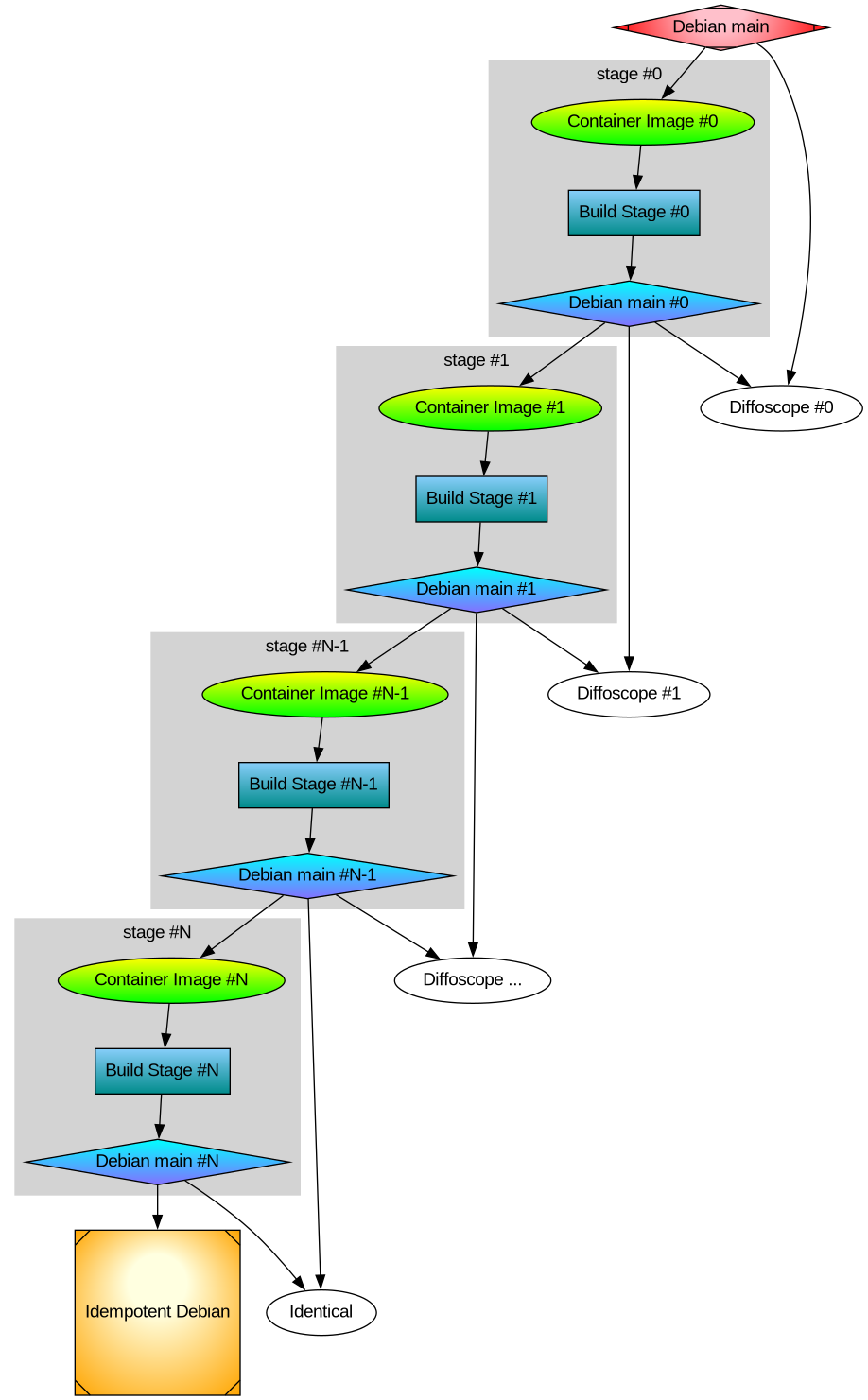
After thinking about multi-stage Debian rebuilds I wanted to implement the idea. Recall my illustration:

Earlier I rebuilt all packages that make up the difference between Ubuntu and Trisquel. It turned out to be a 42% bit-by-bit identical similarity. To check the generality of my approach, I rebuilt the difference between Debian and Devuan too. That was the debdistreproduce project. It “only” had to orchestrate building up to around 500 packages for each distribution and per architecture.

Differential reproducible rebuilds doesn’t give you the full picture: it ignore the shared package between the distribution, which make up over 90% of the packages. So I felt a desire to do full archive rebuilds. The motivation is that in order to trust Trisquel binary packages, I need to trust Ubuntu binary packages (because that make up 90% of the Trisquel packages), and many of those Ubuntu binaries are derived from Debian source packages. How to approach all of this? Last year I created the debdistrebuild project, and did top-50 popcon package rebuilds of Debian bullseye, bookworm, trixie, and Ubuntu noble and jammy, on a mix of amd64 and arm64. The amount of reproducibility was lower. Primarily the differences were caused by using different build inputs.

Last year I spent (too much) time creating a mirror of snapshot.debian.org, to be able to have older packages available for use as build inputs. I have two copies hosted at different datacentres for reliability and archival safety. At the time, snapshot.d.o had serious rate-limiting making it pretty unusable for massive rebuild usage or even basic downloads. Watching the multi-month download complete last year had a meditating effect. The completion of my snapshot download co-incided with me realizing something about the nature of rebuilding packages. Let me below give a recap of the idempotent rebuilds idea, because it motivate my work to build all of Debian from a GitLab pipeline.

One purpose for my effort is to be able to trust the binaries that I use on my laptop. I believe that without building binaries from source code, there is no practically feasible way to trust binaries. To trust any binary you receive, you can de-assemble the bits and audit the assembler instructions for the CPU you will execute it on. Doing that on a OS-wide level this is unpractical. A more practical approach is to audit the source code, and then confirm that the binary is 100% bit-by-bit identical to one that you can build yourself (from the same source) on your own trusted toolchain. This is similar to a reproducible build.

My initial goal with debdistrebuild was to get to 100% bit-by-bit identical rebuilds, and then I would have trustworthy binaries. Or so I thought. This also appears to be the goal of reproduce.debian.net. They want to reproduce the official Debian binaries. That is a worthy and important goal. They achieve this by building packages using the build inputs that were used to build the binaries. The build inputs are earlier versions of Debian packages (not necessarily from any public Debian release), archived at snapshot.debian.org.

I realized that these rebuilds would be not be sufficient for me: it doesn’t solve the problem of how to trust the toolchain. Let’s assume the reproduce.debian.net effort succeeds and is able to 100% bit-by-bit identically reproduce the official Debian binaries. Which appears to be within reach. To have trusted binaries we would “only” have to audit the source code for the latest version of the packages AND audit the tool chain used. There is no escaping from auditing all the source code — that’s what I think we all would prefer to focus on, to be able to improve upstream source code.

The trouble is about auditing the tool chain. With the Reproduce.debian.net approach, that is a recursive problem back to really ancient Debian packages, some of them which may no longer build or work, or even be legally distributable. Auditing all those old packages is a LARGER effort than auditing all current packages! Doing auditing of old packages is of less use to making contributions: those releases are old, and chances are any improvements have already been implemented and released. Or that improvements are no longer applicable because the projects evolved since the earlier version.

See where this is going now? I reached the conclusion that reproducing official binaries using the same build inputs is not what I’m interested in. I want to be able to build the binaries that I use from source using a toolchain that I can also build from source. And preferably that all of this is using latest version of all packages, so that I can contribute and send patches for them, to improve matters.

The toolchain that Reproduce.Debian.Net is using is not trustworthy unless all those ancient packages are audited or rebuilt bit-by-bit identically, and I don’t see any practical way forward to achieve that goal. Nor have I seen anyone working on that problem. It is possible to do, though, but I think there are simpler ways to achieve the same goal.

My approach to reach trusted binaries on my laptop appears to be a three-step effort:

  • Encourage an idempotently rebuildable Debian archive, i.e., a Debian archive that can be 100% bit-by-bit identically rebuilt using Debian itself.
  • Construct a smaller number of binary *.deb packages based on Guix binaries that when used as build inputs (potentially iteratively) leads to 100% bit-by-bit identical packages as in step 1.
  • Encourage a freedom respecting distribution, similar to Trisquel, from this idempotently rebuildable Debian.

How to go about achieving this? Today’s Debian build architecture is something that lack transparency and end-user control. The build environment and signing keys are managed by, or influenced by, unidentified people following undocumented (or at least not public) security procedures, under unknown legal jurisdictions. I always wondered why none of the Debian-derivates have adopted a modern GitDevOps-style approach as a method to improve binary build transparency, maybe I missed some project?

If you want to contribute to some GitHub or GitLab project, you click the ‘Fork’ button and get a CI/CD pipeline running which rebuild artifacts for the project. This makes it easy for people to contribute, and you get good QA control because the entire chain up until its artifact release are produced and tested. At least in theory. Many projects are behind on this, but it seems like this is a useful goal for all projects. This is also liberating: all users are able to reproduce artifacts. There is no longer any magic involved in preparing release artifacts. As we’ve seen with many software supply-chain security incidents for the past years, where the “magic” is involved is a good place to introduce malicious code.

To allow me to continue with my experiment, I thought the simplest way forward was to setup a GitDevOps-centric and user-controllable way to build the entire Debian archive. Let me introduce the debdistbuild project.

Debdistbuild is a re-usable GitLab CI/CD pipeline, similar to the Salsa CI pipeline. It provide one “build” job definition and one “deploy” job definition. The pipeline can run on GitLab.org Shared Runners or you can set up your own runners, like my GitLab riscv64 runner setup. I have concerns about relying on GitLab (both as software and as a service), but my ideas are easy to transfer to some other GitDevSecOps setup such as Codeberg.org. Self-hosting GitLab, including self-hosted runners, is common today, and Debian rely increasingly on Salsa for this. All of the build infrastructure could be hosted on Salsa eventually.

The build job is simple. From within an official Debian container image build packages using dpkg-buildpackage essentially by invoking the following commands.

sed -i 's/ deb$/ deb deb-src/' /etc/apt/sources.list.d/*.sources
apt-get -o Acquire::Check-Valid-Until=false update
apt-get dist-upgrade -q -y
apt-get install -q -y --no-install-recommends build-essential fakeroot
env DEBIAN_FRONTEND=noninteractive \
    apt-get build-dep -y --only-source $PACKAGE=$VERSION
useradd -m build
DDB_BUILDDIR=/build/reproducible-path
chgrp build $DDB_BUILDDIR
chmod g+w $DDB_BUILDDIR
su build -c "apt-get source --only-source $PACKAGE=$VERSION" > ../$PACKAGE_$VERSION.build
cd $DDB_BUILDDIR
su build -c "dpkg-buildpackage"
cd ..
mkdir out
mv -v $(find $DDB_BUILDDIR -maxdepth 1 -type f) out/

The deploy job is also simple. It commit artifacts to a Git project using Git-LFS to handle large objects, essentially something like this:

if ! grep -q '^pool/**' .gitattributes; then
    git lfs track 'pool/**'
    git add .gitattributes
    git commit -m"Track pool/* with Git-LFS." .gitattributes
fi
POOLDIR=$(if test "$(echo "$PACKAGE" | cut -c1-3)" = "lib"; then C=4; else C=1; fi; echo "$DDB_PACKAGE" | cut -c1-$C)
mkdir -pv pool/main/$POOLDIR/
rm -rfv pool/main/$POOLDIR/$PACKAGE
mv -v out pool/main/$POOLDIR/$PACKAGE
git add pool
git commit -m"Add $PACKAGE." -m "$CI_JOB_URL" -m "$VERSION" -a
if test "${DDB_GIT_TOKEN:-}" = ""; then
    echo "SKIP: Skipping git push due to missing DDB_GIT_TOKEN (see README)."
else
    git push -o ci.skip
fi

That’s it! The actual implementation is a bit longer, but the major difference is for log and error handling.

You may review the source code of the base Debdistbuild pipeline definition, the base Debdistbuild script and the rc.d/-style scripts implementing the build.d/ process and the deploy.d/ commands.

There was one complication related to artifact size. GitLab.org job artifacts are limited to 1GB. Several packages in Debian produce artifacts larger than this. What to do? GitLab supports up to 5GB for files stored in its package registry, but this limit is too close for my comfort, having seen some multi-GB artifacts already. I made the build job optionally upload artifacts to a S3 bucket using SHA256 hashed file hierarchy. I’m using Hetzner Object Storage but there are many S3 providers around, including self-hosting options. This hierarchy is compatible with the Git-LFS .git/lfs/object/ hierarchy, and it is easy to setup a separate Git-LFS object URL to allow Git-LFS object downloads from the S3 bucket. In this mode, only Git-LFS stubs are pushed to the git repository. It should have no trouble handling the large number of files, since I have earlier experience with Apt mirrors in Git-LFS.

To speed up job execution, and to guarantee a stable build environment, instead of installing build-essential packages on every build job execution, I prepare some build container images. The project responsible for this is tentatively called stage-N-containers. Right now it create containers suitable for rolling builds of trixie on amd64, arm64, and riscv64, and a container intended for as use the stage-0 based on the 20250407 docker images of bookworm on amd64 and arm64 using the snapshot.d.o 20250407 archive. Or actually, I’m using snapshot-cloudflare.d.o because of download speed and reliability. I would have prefered to use my own snapshot mirror with Hetzner bandwidth, alas the Debian snapshot team have concerns about me publishing the list of (SHA1 hash) filenames publicly and I haven’t been bothered to set up non-public access.

Debdistbuild has built around 2.500 packages for bookworm on amd64 and bookworm on arm64. To confirm the generality of my approach, it also build trixie on amd64, trixie on arm64 and trixie on riscv64. The riscv64 builds are all on my own hosted runners. For amd64 and arm64 my own runners are only used for large packages where the GitLab.com shared runners run into the 3 hour time limit.

What’s next in this venture? Some ideas include:

  • Optimize the stage-N build process by identifying the transitive closure of build dependencies from some initial set of packages.
  • Create a build orchestrator that launches pipelines based on the previous list of packages, as necessary to fill the archive with necessary packages. Currently I’m using a basic /bin/sh for loop around curl to trigger GitLab CI/CD pipelines with names derived from https://popcon.debian.org/.
  • Create and publish a dists/ sub-directory, so that it is possible to use the newly built packages in the stage-1 build phase.
  • Produce diffoscope-style differences of built packages, both stage0 against official binaries and between stage0 and stage1.
  • Create the stage-1 build containers and stage-1 archive.
  • Review build failures. On amd64 and arm64 the list is small (below 10 out of ~5000 builds), but on riscv64 there is some icache-related problem that affects Java JVM that triggers build failures.
  • Provide GitLab pipeline based builds of the Debian docker container images, cloud-images, debian-live CD and debian-installer ISO’s.
  • Provide integration with Sigstore and Sigsum for signing of Debian binaries with transparency-safe properties.
  • Implement a simple replacement for dpkg and apt using /bin/sh for use during bootstrapping when neither packaging tools are available.

What do you think?

Verified Reproducible Tarballs

Remember the XZ Utils backdoor? One factor that enabled the attack was poor auditing of the release tarballs for differences compared to the Git version controlled source code. This proved to be a useful place to distribute malicious data.

The differences between release tarballs and upstream Git sources is typically vendored and generated files. Lots of them. Auditing all source tarballs in a distribution for similar issues is hard and boring work for humans. Wouldn’t it be better if that human auditing time could be spent auditing the actual source code stored in upstream version control instead? That’s where auditing time would help the most.

Are there better ways to address the concern about differences between version control sources and tarball artifacts? Let’s consider some approaches:

  • Stop publishing (or at least stop building from) source tarballs that differ from version control sources.
  • Create recipes for how to derive the published source tarballs from version control sources. Verify that independently from upstream.

While I like the properties of the first solution, and have made effort to support that approach, I don’t think normal source tarballs are going away any time soon. I am concerned that it may not even be a desirable complete solution to this problem. We may need tarballs with pre-generated content in them for various reasons that aren’t entirely clear to us today.

So let’s consider the second approach. It could help while waiting for more experience with the first approach, to see if there are any fundamental problems with it.

How do you know that the XZ release tarballs was actually derived from its version control sources? The same for Gzip? Coreutils? Tar? Sed? Bash? GCC? We don’t know this! I am not aware of any automated or collaborative effort to perform this independent confirmation. Nor am I aware of anyone attempting to do this on a regular basis. We would want to be able to do this in the year 2042 too. I think the best way to reach that is to do the verification continuously in a pipeline, fixing bugs as time passes. The current state of the art seems to be that people audit the differences manually and hope to find something. I suspect many package maintainers ignore the problem and take the release source tarballs and trust upstream about this.

We can do better.

I have launched a project to setup a GitLab pipeline that invokes per-release scripts to rebuild that release artifact from git sources. Currently it only contain recipes for projects that I released myself. Releases which where done in a controlled way with considerable care to make reproducing the tarballs possible. The project homepage is here:

https://gitlab.com/debdistutils/verify-reproducible-releases

The project is able to reproduce the release tarballs for Libtasn1 v4.20.0, InetUtils v2.6, Libidn2 v2.3.8, Libidn v1.43, and GNU SASL v2.2.2. You can see this in a recent successful pipeline. All of those releases were prepared using Guix, and I’m hoping the Guix time-machine will make it possible to keep re-generating these tarballs for many years to come.

I spent some time trying to reproduce the current XZ release tarball for version 5.8.1. That would have been a nice example, wouldn’t it? First I had to somehow mimic upstream’s build environment. The XZ release tarball contains GNU Libtool files that are identified with version 2.5.4.1-baa1-dirty. I initially assumed this was due to the maintainer having installed libtool from git locally (after making some modifications) and made the XZ release using it. Later I learned that it may actually be coming from ArchLinux which ship with this particular libtool version. It seems weird for a distribution to use libtool built from a non-release tag, and furthermore applying patches to it, but things are what they are. I made some effort to setup an ArchLinux build environment, however the now-current Gettext version in ArchLinux seems to be more recent than the one that were used to prepare the XZ release. I don’t know enough ArchLinux to setup an environment corresponding to an earlier version of ArchLinux, which would be required to finish this. I gave up, maybe the XZ release wasn’t prepared on ArchLinux after all. Actually XZ became a good example for this writeup anyway: while you would think this should be trivial, the fact is that it isn’t! (There is another aspect here: fingerprinting the versions used to prepare release tarballs allows you to infer what kind of OS maintainers are using to make releases on, which is interesting on its own.)

I made some small attempts to reproduce the tarball for GNU Shepherd version 1.0.4 too, but I still haven’t managed to complete it.

Do you want a supply-chain challenge for the Easter weekend? Pick some well-known software and try to re-create the official release tarballs from the corresponding Git checkout. Is anyone able to reproduce anything these days? Bonus points for wrapping it up as a merge request to my project.

Happy Supply-Chain Security Hacking!